Made with FYPNova
Calm in the middle of the storm
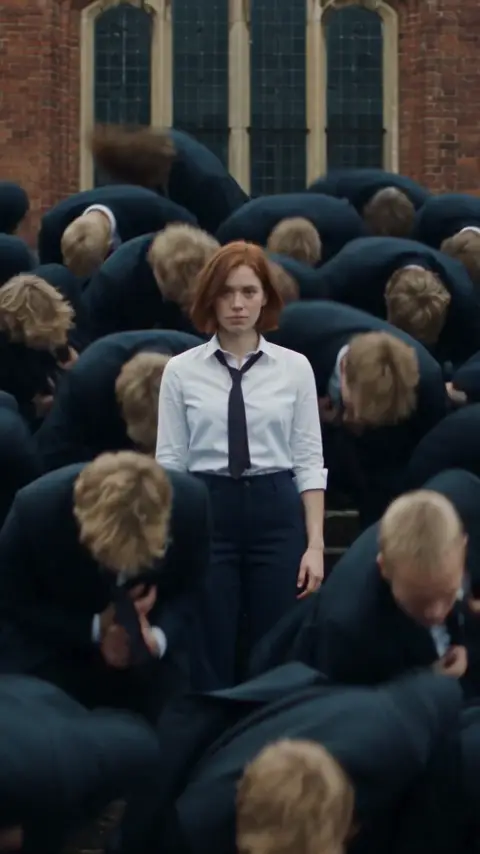
An auburn bob and a white shirt stay perfectly still while rows of blond suits jerk into the dance around her.
A schoolyard packed with dark-suited figures, all motionless. When the drop hits, every one of them snaps into the same frantic, jerking dance, and in the middle a lone figure in a white shirt keeps perfectly still. Upload a photo of yourself and one for the crowd, and the Storm AI dance generator makes you the calm center. Made with Seedance 2.5, 115 credits per video, no watermark.
 Trending
Two uploads built this scene. The first photo is the one who never moves; the second is cloned into the crowd. Tap to play it with sound.
An auburn bob and a white shirt stay perfectly still while rows of blond suits jerk into the dance around her.
It traces back to the STORM II music video from spring 2026. Dozens of boys in dark school uniforms stand in tight lines outside a red-brick building, frozen, until the track kicks in and they all jolt into the same spasming choreography. Right in the center, someone in white never joins in.
By September 2026 AI versions of that frame were all over TikTok, Reels and Shorts. Creators cast themselves as the motionless figure in white, perfectly unbothered, as the mass around them twists and jerks to the music. The stillness against the chaos is the joke, and it fits almost any caption.
The Storm AI dance generator on FYPNova builds the scene from two photos. The first becomes the lead in the white shirt. The second sets the look of the crowd, repeated across the rows in dark suits. Choreography, cuts and camera come from the template, so the timing is the same every time.
Two photos and a click. No choreography to learn.
STORM Dance is preselected in the FYPNova generator; choose a wide, classic or vertical frame.
Photo 1 is the lead who stays still. Photo 2 sets the look of the crowd. One person per photo.
Seedance 2.5 renders the scene and the soundtrack is added on the drop. Usually ready in about 10 minutes, HD, no watermark.
The lead is shown close and still for long moments, so their face should be sharp. The crowd photo is repeated many times, so a neutral, clear face works best there.
Stay calm and caption it:
You in the white shirt, the crowd as everyone else panicking.
Use a friend’s photo for the crowd and watch them flail around you.
The inbox explodes. You do not move.
The boss stays still while the whole team erupts.
115 credits per video
Subscriptions start at $16.58/mo on yearly billing, one-off credit packs at $14.90. Paying yearly takes up to 16% off, which brings the cheapest template down to $4.68 a video.
A wave of AI edits built on one frame of the STORM II video: a lone figure in white stays frozen as a sea of dark suits jerks into identical moves when the beat drops.
A template inside FYPNova. You upload two photos, one for the lead and one for the crowd, and AI builds the full scene with the original timing.
The first photo is the calm lead. The second sets the face of the crowd. You can use your own photo for both if you want a crowd of yourself.
Wide 16:9, classic 4:3 or vertical 9:16. Every video is 28 seconds with the soundtrack.
Usually about 10 minutes. The finished video waits in your history if you leave the page.
Each storm AI dance video costs 115 credits. Failed videos are refunded automatically.
No. FYPNova runs separately from the band, their label and the video’s director. Upload photos only with the subject’s permission.
Two photos, one click, one storm. 115 credits per video, HD with soundtrack, no watermark.